Container resource management
To ensure optimal performance and prevent heavy resource usage peaks that could impact other projects, resource management should be set up based on the workloads's specific needs. Existing workloads or similar projects under the Metrics tab can be used as a starting reference.
Resource limits & reservations should be set up for all workload types, not only deployments. The setup should be the same for all different workload types, but for simplicity, this guide will focus on deployments. If you're creating a new deployment, you should find a project with similar application stack as a reference (e.g. FastAPI, Symfony, VueJS, etc...)
- Resource limits are used to make sure high load won't affect other projects running on the same node and isolating potential issues the the container itself.
- Resource reservations are used so the cluster can schedule containers effectively while not overprovisioning on nodes.
1. Calculating resources
Use the rancher namespace dropdown to select the namespace you wish to edit the Deployment for. Select the workload you wish to use as a baseline. Click on the metrics tab. Set the Range to 1d and try to get a rough estimate for these values:
CPU Utilization, use an biggest peak in CPU of the last day as this value.Memory Utilization, use a rough estimate of the average memory utilization of the last day.
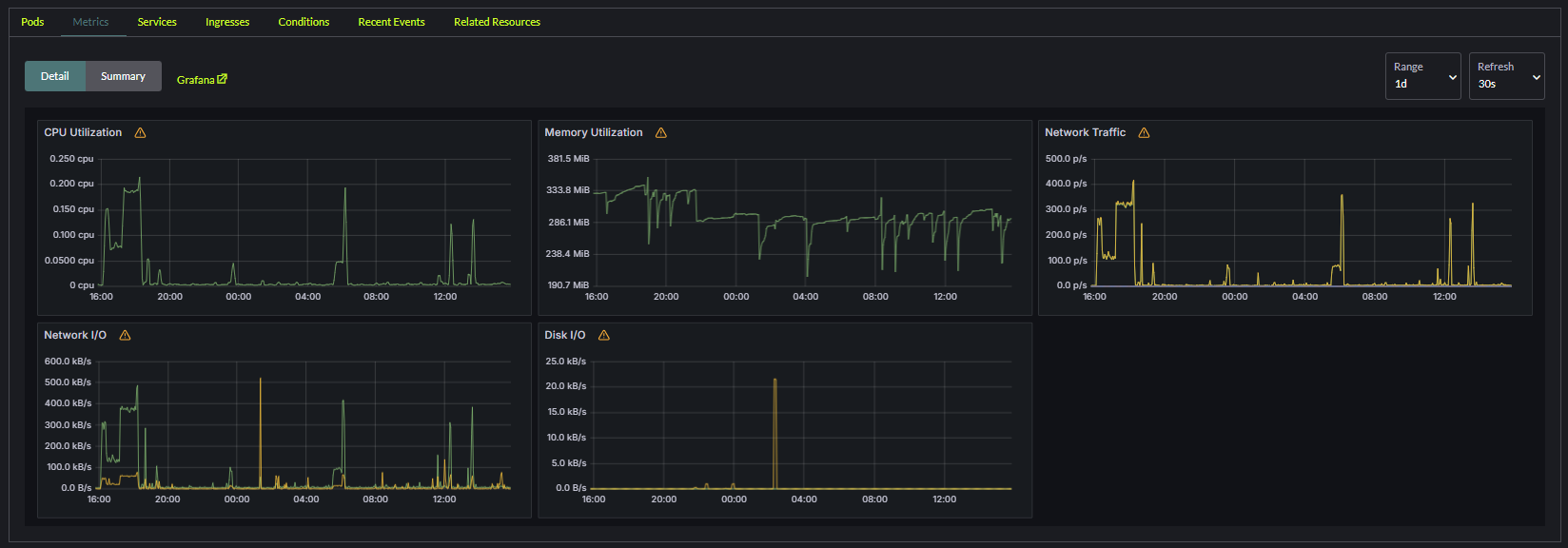
We'll use the average values to estimate the appropriate resource limits & reservations for your container. We'll do this by via these formulas:
CPU Limit: (Peak utilization * 1.5) * 1000CPU Reservation: (Peak utilization * 0.5) * 1000Memory Limit: Avg utilization * 1.5Memory Reservation: Avg utilization * 0.5
So in the above example we would set the following limits:
CPU, highest peak is around 0.2 CPU.Resource Limit:(0.2 x 1.5) * 1000 = 300. So our CPU limit will be300Resource reservation:(0.2 x 0.5) * 1000 = 100. So our CPU reservation will be100
Memory, average utilization is around 280.Resource Limit:280 x 1.5 = 420. So our memory limit will be420Resource reservation:280 x 0.5 = 140. So our memory reservation will be140
2. Set Resources for Containers
Resource settings are configured per container within a deployment.
Locate the workload you want to edit and press the Edit config. For each container set the following under the Resources tab:
CPU Reservation: Use the value previously calculated.CPU Limit: Use the value previously calculated.Memory Reservation: Use the value previously calculated.Memory Limit: Use the value previously calculated.
3. Test and Monitor Resource Usage over time
- Monitor the deployment metrics post-configuration to ensure the resources are adequately allocated:
- Look for throttling in CPU or memory usage.
- Adjust the resource requests and limits as needed based on observed performance.
- Periodically review the metrics for spikes or underutilization and update the resource settings accordingly.